Postback (pingback, s2s pixel) is a mechanism for passing data from an affiliate network (or an advertiser) to a tracking solution. Put simply: when the advertiser gets a conversion, the affiliate network itself pings a special URL in your tracker and says that a click with a certain ID made money (or did not).
Page updated August 10, 2026.
In 2026, postback is not going anywhere—and it will clearly die later than the tracking pixel. Ad blockers and browser restrictions hit pixels; S2S goes directly between servers. But the click ID still has to reach the affiliate network first, or there is nothing to tie the conversion to.
Click/visit → click ID → conversion → postback → report. The terminology can get confusing: a click may not actually be a click but a visit to a landing page. It can be a click on a tracking link or just a redirect. It depends on the tracker and the funnel, but the point is that this is an ID that lets you understand exactly what is making you money and, in some cases, pass that information even further back to the traffic source.
Postback (post back, post-back, postback) has other names too: pingback, server-to-server pixel (S2S pixel), S2S postback, server tracking postback. The Conversion API (CAPI) from Facebook/TikTok and Snapchat is also a postback, just a slightly fancier one. Even Wikipedia has a definition.
How postback works:
- A user clicks an ad. Usually, the ad contains the URL of a tracking solution, not the URL of the affiliate network or the final advertiser.
- The user goes through the URL of the tracking solution. At that point, the visit (click) gets a unique ID and the tracker writes some transactions to its database.
- After assigning the unique ID, the tracker redirects the user to the affiliate network URL, adding the unique click ID to it, something like
&aff_sub=123456789. - The user reaches the offer landing page and may complete the target action there. Or may not.
- If they do, the affiliate network knows that the user’s
aff_subparameter was 123456789. At that point, it calls a special URL in your tracking system with that same parameter, something liketracker.com/track.php?subid=123456789. - Now the tracker will show in its reports that this exact click brought the conversion. If you configured everything correctly in the tracker, the click is tied to the ad network, the ad, and another dozen parameters used for optimization.
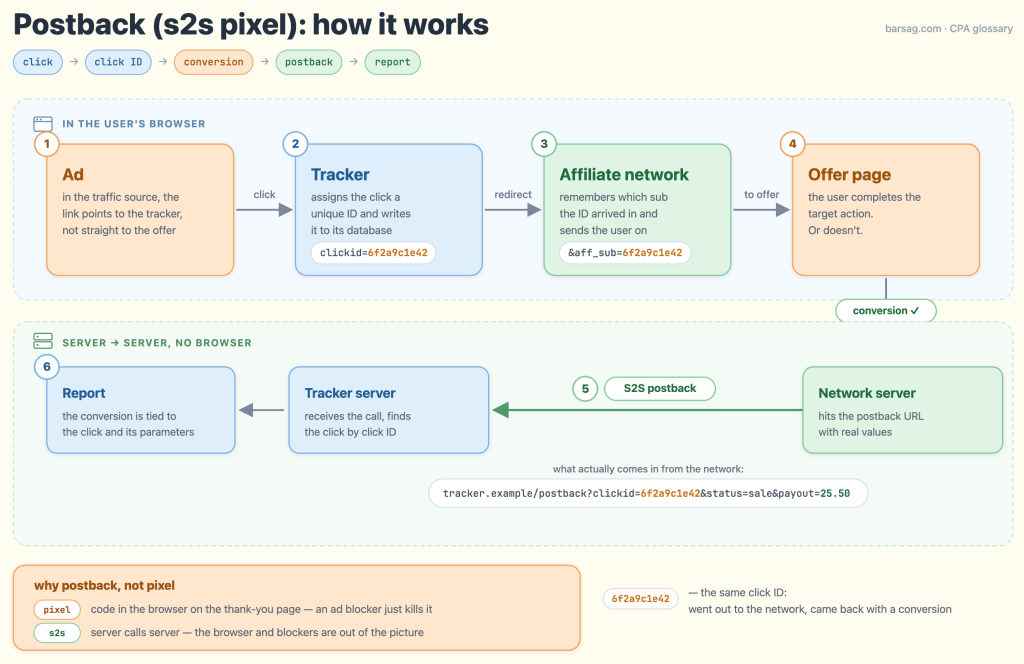
That is it. It sounds more complicated than it actually is. Most affiliate network platforms can handle postback.
Why use an external tracker at all
The general setup in traffic arbitrage looks like this:
- I buy traffic in some system, whether it is Google Ads, TikTok, a push network, or something else.
- I need to know which ads, keywords, phone models, and other parameters bring conversions.
- I need a convenient way to analyze all that data and see both the clicks that convert and those that do not.
- The reporting systems in affiliate networks usually do not show the full picture.
This leads to using an external tracker that:
- Can track 10–20 incoming parameters for each unique click.
- Can work with conversion data.
What a modern postback URL looks like
The postback template a tracker gives you looks roughly like this:
https://tracker.example/postback?clickid={clickid}&status={status}&payout={payout}¤cy={currency}&tid={transaction_id}And this is what actually arrives from the affiliate network after a conversion:
https://tracker.example/postback?clickid=6f2a9c1e42&status=sale&payout=25.50¤cy=USD&tid=INV-10023The template contains macros in curly braces, and the affiliate network replaces them with real values when it makes the call. If you see the literal {clickid} in the tracker logs, braces and all, the replacement did not work.
| Parameter | What it passes | Typical names and macros |
|---|---|---|
| click ID | The unique click ID that the tracker sent to the affiliate network on the click and the affiliate network returned in the postback. The main parameter: nothing works without it. | clickid, subid, aff_sub, s2s_id |
| status | What exactly happened: lead, sale, deposit, rejection, hold. An optional parameter. | status, goal, event |
| payout | The payout for the conversion. The reason this whole thing exists. | payout, sum, revenue |
| currency | The payout currency. Without it, the default currency is tracked, usually USD. | currency, cur |
| transaction ID | The unique conversion ID on the affiliate network side. It helps distinguish repeat conversions and fight duplicates. How exactly depends on the tracker. | tid, txn_id, action_id |
Setting up the affiliate network–tracker connection
- Get the postback URL template from the tracker. It already contains macros such as
{clickid}and{payout}. - Open the Postback / Global Postback / S2S section in the affiliate network. If the network supports a global postback, it catches conversions for every offer. An offer-level postback only catches one. Starting with the global one is easier.
- Paste the tracker URL and put the affiliate network’s macros into it: for
clickid=, use the macro for the sub field where the affiliate network received the click ID (for example,{aff_sub}); forpayout=, use the payout macro; and so on. This is the most common source of errors: every affiliate network uses its own macro names. - Check the offer link: the click ID must actually go to the affiliate network, meaning the link contains something like
&aff_sub={clickid}. No click ID going in means there is nothing to return. - Make a test conversion or click the test postback button if the affiliate network provides one.
- Check the postback log in the tracker: the request arrived, the click ID was recognized, and the payout and currency are not lying.
- If the affiliate network can pass statuses, set up their mapping so holds and rejections do not look like profit in the reports.
Statuses, repeat conversions, and deduplication
Sometimes a conversion is not a single event. First a lead, pending, or dep arrives; then the advertiser, for example, calls the user, and the conversion becomes approved or gets rejected. If the tracker does not distinguish statuses, duplicates can appear.
- Different goals. A lead, a sale, and a repeat deposit are different goals in the tracker, with different payouts. The affiliate network either sends them to different postback URLs or passes the event type as a parameter.
- Repeat conversions. Rebills and repeat deposits usually arrive with the same click ID but a new transaction ID. The tracker must be able to accept multiple conversions for one click.
- Deduplication. Two identical postbacks must not turn into two sales. But trackers have their own rules: one ignores a duplicate, another updates or adds up the conversion. The check is simple: send the same test twice and look at the report.
If postback does not work: checklist
- The log still contains
{clickid}with the curly braces. The macro was not replaced: either the macro name is wrong or the postback was pasted into the wrong section of the affiliate network. - The click ID is empty or truncated. The parameter got lost on the way: a redirect chain, prelander, or shortener ate the query string, or the affiliate network is returning a different sub field from the one you used.
- There are conversions, but the status is wrong. The affiliate network sends
leadwhen it should send, say,sale. Fix it with status mapping. - Duplicate conversions. The transaction ID is missing, mapped incorrectly, or the tracker handles repeat delivery differently. Send the same test twice and see what happens.
- Strange amounts. The payout arrives in cents, in another currency, or with a comma instead of a decimal point. Check the currency and format on a test conversion, not after the first payout.
- The affiliate network says “sent,” but the tracker says nothing. Check the HTTP response on the affiliate network side: 4xx/5xx means a broken URL, a bad key, or a dead tracker. Decent affiliate networks show a postback log with the response code; indecent ones silently drop it.
Postback, pixel, API, or server-side tagging
There are other options too, such as tracking pixels or manual exports.
- S2S postback—the affiliate network’s server calls the tracker’s server directly. The call itself happens without a browser or cookies, but the click ID must reach the affiliate network first. The de facto standard in traffic arbitrage.
- Tracking pixel—an image or JS code on the thank-you page. It depends on the user’s browser, so an ad blocker can simply block it.
- Webhook—a close relative of postback: an external service sends an event itself, often as a POST request with JSON and a signature.
- API—usually the reverse setup: your system fetches the data itself or sends it to another service. Meta CAPI and TikTok Events API send conversions back to the traffic source so its algorithm can see the result.
- Server-side tagging—a separate mechanism: a server-side container receives events from a site and sends them on to analytics and advertising systems. It is not another name for postback.
Tracking pixels are a pain—affiliate networks refuse to stick your pixel on the offer’s thank-you page.
Postback security
- HTTPS only. Postback over HTTP in 2026 is like a password on a sticky note.
- Postback key. A secret parameter or signature in the URL that the tracker verifies. Without a key, anyone who has the URL can stuff you with conversions.
- Do not stuff people into the URL. Email addresses, phone numbers, and names in GET parameters spread across logs. A click ID is better: it usually does not contain a name or email address.
- Screenshots and logs. A postback URL with a key lets someone draw fake conversions in your reports and wreck your optimization. Before dropping a settings screenshot into a chat with “why doesn’t it work,” blur the key and the tracker domain.
- Messengers. When you send a full postback URL, many messengers prefetch it—basically sending a postback for you. Break the URL so messengers do not stuff you with postbacks.
How I explained it in 2013
Below is an excerpt from my 2013 article.
For example, the simplest case is direct linking. This is how I buy traffic:
- I place a link to my tracker, something like
mytrackerurl.com/index.php?CID=id&ppc=ppc1&ad=ad1&adgroup=adgroup1&keyword=keyword1. In other words, the user passes through my tracker without noticing. All parameters are written to the tracker: where they came from, which ad they clicked, which carrier and handset they use, and so on. At the same moment, the user gets a unique ID. For example, 42, 123, or 18237482. - After the user passes through the tracker, they are sent to the affiliate network link, something like
affnetworktracker.com/offerlink. The tracker adds that same unique ID to the link. The result looks likeaffnetworktracker.com/offerlink?subid=42. The affiliate network records this information too. - If ID 42 gets a conversion, the affiliate network pings my tracker with that ID substituted into the URL. In other words, it calls something like
mytrackerurl.com/update.php?subid=42. - The tracker writes this information to the database. In the reports, I can see that this exact click brought me a conversion.
For beginners: definitions of all the terms are in my CPA glossary.